Pricing
One plan
per agent app.
Billing is per app, not per account. Each agent you deploy carries its own plan, and one app at a time runs on a 7-day free trial of the full product. When the trial ends, the app pauses until you choose a plan. Nothing is deleted, and picking a plan resumes it. Upgrade only the apps that take off.
Public beta preview
One app at a time runs on a 7-day free trial of the full product. Once it's on a plan or archived, your next app gets its own.
Starter
$49 /mo per app
For a first agent in real hands.
- 1,200 generations / month
- $20/mo managed-LLM credit
- Agent sizes XS–SM
- Email support
Pro
Popular$129 /mo per app
For agents with a growing user base.
- 3,500 generations / month
- $50/mo managed-LLM credit
- Agent sizes XS–MD
- Priority support
Scale
$299 /mo per app
For high-volume production workloads.
- 9,000 generations / month
- $100/mo managed-LLM credit
- Agent sizes XS–XL
- Dedicated support
Compare
Every plan, side by side.
| Feature | Starter | Pro | Scale |
|---|---|---|---|
| Price / month | $49 | $129 | $299 |
| Generations / month | 1,200 | 3,500 | 9,000 |
| Managed-LLM credit / month | $20 | $50 | $100 |
| Default spending cap | $50 / mo | $100 / mo | $200 / mo |
| Agent sizes | XS–SM | XS–MD | XS–XL |
| Pods per agent | 2 | 5 | 10 |
| Concurrent turns (max) | up to 30 (designed for about 40 people at once) | up to 155 (designed for about 200 people at once) | up to 1270 (designed for about 1600 people at once) |
| Included app storage | 25 GiB | 100 GiB | 500 GiB |
| Custom domains | — | Yes | Yes |
| Agent runtime | Always on | Always on | Always on |
| Team members | 1 | Unlimited | Unlimited |
| Support | Priority | Dedicated |
Runtime is the same on every plan, the trial included: each deployed agent gets its own runtime, an isolated pod that stays up from deploy until you undeploy it. An app on a plan never sleeps, so nothing cold-starts — the first message of the day is as fast as the last. The one exception is the end of the free trial: after 7 days an app with no plan is paused (its pod scales to zero and the chat surface says so) until you choose one, and choosing one resumes it within minutes without a redeploy. Hosted MCP servers work the other way by design: they scale to zero after about 30 minutes idle and wake on the next call. One honest footnote: a single-pod agent may move between nodes between turns as the platform rebalances — never mid-turn — so a conversation can see one brief pause on its next message. Run two or more pods and the platform keeps one serving throughout.
Capacity by agent size
| Size | Concurrent turns per pod1 | Active conversations per pod2 |
|---|---|---|
| xs | 7 | designed for about 10 people at once |
| sm | 15 | designed for about 20 people at once |
| md | 31 | designed for about 40 people at once |
| lg | 63 | designed for about 80 people at once |
| xl | 127 | designed for about 160 people at once |
Your app's total capacity = slots × pods. Each plan sets how many pods an agent can scale to (see “Pods per agent” above) — a Pro agent on md runs up to 31 × 5 = 155 concurrent turns, designed for about 200 people at once.
- A turn is your agent actively generating a reply. This is the enforced limit per pod — when every slot is busy, additional turns wait a few seconds and retry automatically; open sessions are never dropped.
- A design target from concurrent-turn capacity (about 1.4 people per in-flight turn). We publish measured figures once real traffic exists. Above a pod’s service rate it queues — latency, not failure. Idle and open conversations are unbounded.
- Turn slots are derived from each size's memory reservation (256 MiB per in-flight turn on top of a 256 MiB pod base) and enforced per pod by the runtime governor — the slot numbers we print are the ones the platform actually enforces.
How it works
Metered, capped, no surprises.
Generations
What counts.
Every time your agent renders generative UI counts as a generation against the app's monthly quota. Past the quota, renders are priced per generation against the app's spending cap — except during the free trial, which has no overage rate and simply pauses at the quota.
Managed LLM
Usage on your bill.
Paid apps can use managed LLM keys — no provider account needed. Token usage is metered against the plan's included monthly credit, then against the app's spending cap. Prefer your own key? Bring it on any plan and your provider bills the conversation directly.
Spending caps
You hold the switch.
Your spending cap is the ceiling on usage-driven overage — model usage, generations, and storage. By default it is a hard cap: at the cap the app pauses serving instead of billing more. Where metered overage is available you can switch an app to a soft cap — serving continues past the cap and the overage bills at the rates below. Extra agent pods are the one thing outside the cap: you configure them explicitly, and they bill at the published rate. The default never surprises you.
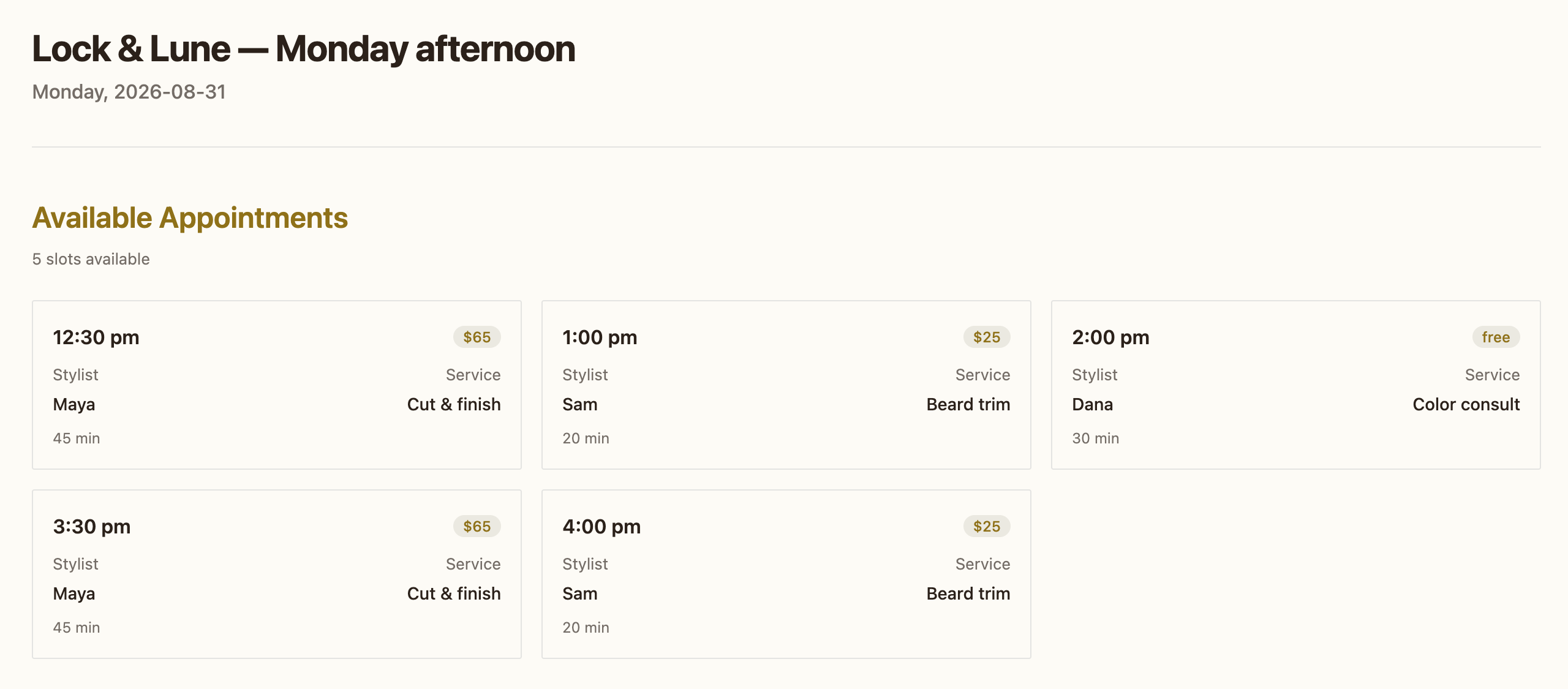
This is one generation — a bookable availability card the live demo agent drew. Watch it happen live →
Plan changes are per app too: upgrades apply immediately (prorated), downgrades take effect at the end of the current billing period.
Overage
The rates, before you owe them.
Four things meter past what your plan includes. These are the rates they bill at as metered billing rolls out — published here first, so no number on an invoice is one you are seeing for the first time. Until metered billing is switched on for your app, every one of these ceilings simply stops instead of billing: the cap is the cap either way.
| Renders past the quota | Starter | Pro | Scale |
|---|---|---|---|
| New generation | $0.10 ea | $0.09 ea | $0.085 ea |
| Cache hit | $0.02 ea | $0.015 ea | $0.012 ea |
Two rates, because two different things happen when your agent renders: a new generation runs the model, whether your agent uses Guuey's key or your own, and a cache hit reuses a blueprint you already paid for. Your plan's included generations cover new generations first, then cache hits. The trial has no overage rate: a trial app pauses at the quota.
Extra agent pods
$0.04 / unit-hour.
Your agent's first pod is included in the plan — you are billed only for pods above it. One xs pod for one hour is one unit-hour; larger sizes count more (sm ×2, md ×4, lg ×8, xl ×16). Pod time bills on your invoice but does not count toward the spending cap — you choose how many pods an agent may run, and that ceiling is what bounds the spend. Your plan's pod ceiling is in the table above.
App storage
$0.0001 / GiB-hour.
Each plan includes app storage (see the table above); anything held beyond it meters by the hour — about $0.073 per GiB held for a 730-hour month. Delete data and the meter stops that hour.
Managed LLM
Cost, plus the platform premium.
Token usage on managed keys is metered at what the provider charges us plus a platform premium, drawn from your plan's included monthly credit first. Bring your own key and this meter reads zero, because the provider bills you directly.
FAQ
The questions before the card.
What happens when the 7-day trial ends?
The app pauses until you pick a plan — nothing runs, nothing bills. Picking a plan wakes it.
What exactly is a pod?
Every app gets its own runtime — an isolated pod that stays up from deploy to undeploy. Busy apps can run more pods; you set the ceiling, and only pods beyond the first bill.
Can my bill surprise me?
No. Generations stop at your plan's spending cap unless you raise it, and pod spend is bounded by the pod ceiling you set yourself.
Do I need a plan for every app?
Yes — plans are per app, like a website builder. Each agent app carries its own plan and its own trial.
Can I bring my own LLM key?
Yes, on every plan. With your own key the managed-LLM meter reads zero — the provider bills you directly. Paid plans also include a monthly managed-LLM credit if you'd rather not.
Where do I get help?
Start with the docs, ask in the Discord community, or write to support@guuey.com for anything about your account or bill.
Public beta preview
Pick a plan. Flip it on.
Your first app starts with a 7-day free trial